
Running Investigations with the Bronto Hosted MCP Server
Ciaran McGauran
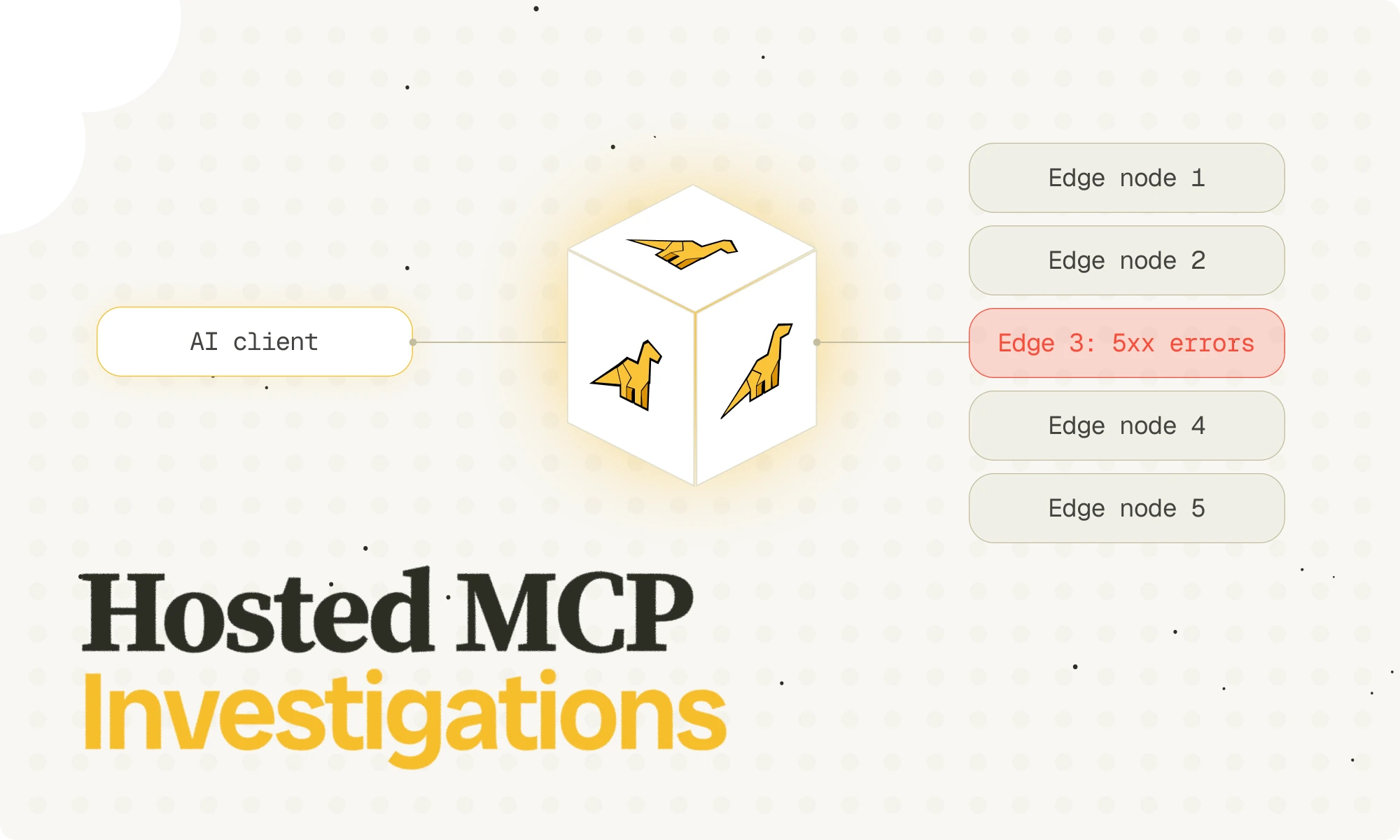
An earlier blog post, Bronto MCP Server, introduced Bronto's local MCP server and showed how AI clients can use log data to answer operational questions. That post focused on the developer-managed, local setup: run the server locally, connect it to Bronto with an API key, and let clients like Claude Code query logs through MCP tools.
We now support a hosted MCP experience. Instead of running the MCP server yourself, you can enable MCP access in the Bronto UI, sign in with your existing Bronto login method (oAuth, SSO or Google Social), and connect supported MCP clients directly to Bronto's hosted MCP endpoint.
The result is a much simpler setup for teams that want the benefits of MCP without managing a local server process or distributing API keys to individual developers.
In this post we explain how to set up and use the hosted MCP server and show how it enables some very powerful agentic observability use cases with some examples using CDN logs.
Why a hosted MCP server?
The local MCP server is still a good fit for developers. It is flexible, easy to inspect, and works well when an engineer wants to wire Bronto into a local MCP client quickly.
But a hosted model solves a different set of problems:
no local server github repos to clone, process to install, run, or keep up to date
no user-managed API keys for routine MCP access
sign-in uses the same login methods already managed in Bronto
access can be governed centrally in the Bronto UI
teams can standardize on one managed MCP endpoint
enables the use of Bronto in environments and platforms that only support remote MCP eg. AWS DevOps Agent
In short, the local version is better for local setup and experimentation. The hosted version is better when you want Bronto to manage authentication and access. It also gives administrators clearer control over whether MCP is enabled and which login methods are allowed.
What changes compared with the local version?
At a tool level, the experience is familiar. Clients still get access to Bronto datasets, keys, values, log search, and metrics. What changes is how access is granted.
With the hosted MCP server:
administrators enable MCP login method and control which sign-in methods are allowed for MCP access.
users sign in through Bronto's normal authentication flow
MCP clients complete a browser-based OAuth flow
Bronto issues and validates the MCP access tokens
This keeps the user experience much closer to a normal SaaS sign-in flow while still exposing Bronto data through MCP.
Enabling MCP in the UI
To enable MCP for your Bronto account and connect an MCP client, follow the instructions here.
What can you ask it?
The best hosted MCP workflows are the same ones that made the local version useful: discovering relevant datasets, narrowing the search space, then asking focused operational questions.
CDN logs are a particularly good example because they are high-volume, operationally important, and often the first place teams look when users report latency, origin instability, or unusual traffic patterns.
Below are a few examples of prompts that can perform useful fault-finding and analysis on example CDN logs and that work well using Claude and Opus 4.6.
Example 1: Find the right CDN datasets
Prompt:
Which datasets contain production CDN logs for our edge or delivery layer?
Why this matters:
teams often have multiple CDN-related datasets
names of datasets are not always obvious and can cause delays to users while they try to find the datasets to search or they search more datasets than they need to
The hosted MCP server can first identify likely datasets, then surface the log IDs, collections, and tags needed to scope later queries properly.
In our case, the hosted MCP flow surfaced two production CDN and edge-layer datasets immediately:
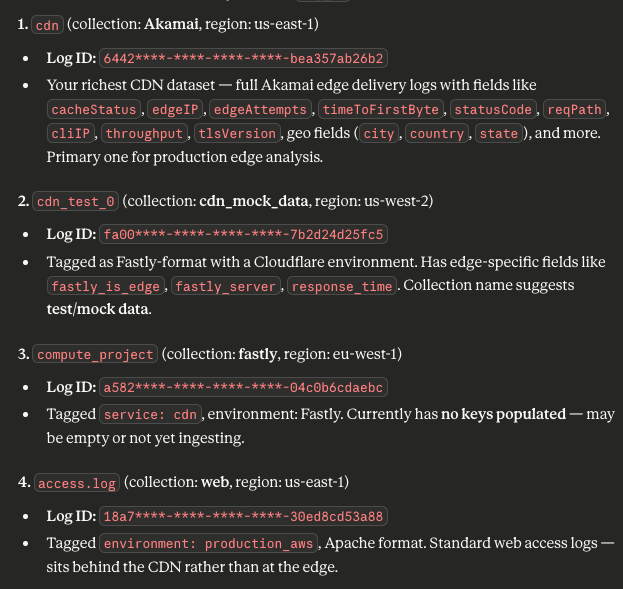
Example 1 result based on the hosted MCP dataset inventory flow.
That is a good example of the kind of first-pass result you want from hosted MCP. Before you ask for regressions, spikes, or cache behaviour, you first want the system to tell you which datasets are actually carrying the production CDN traffic.
Example 2: Look for elevated error responses
Prompt:
In the last 30 minutes, look through our CDN logs for elevated 5xx responses and group them by host, path, and status code.
What to look for in CDN logs:
spikes in 5xx status codes
concentration on a single hostname, service, or path
whether the failures are broad or isolated
whether only a subset of POPs or edges are affected
This is one of the fastest ways to distinguish:
a widespread origin issue
a bad deploy affecting one route
a customer-specific path problem or noisy but low-impact isolated errors
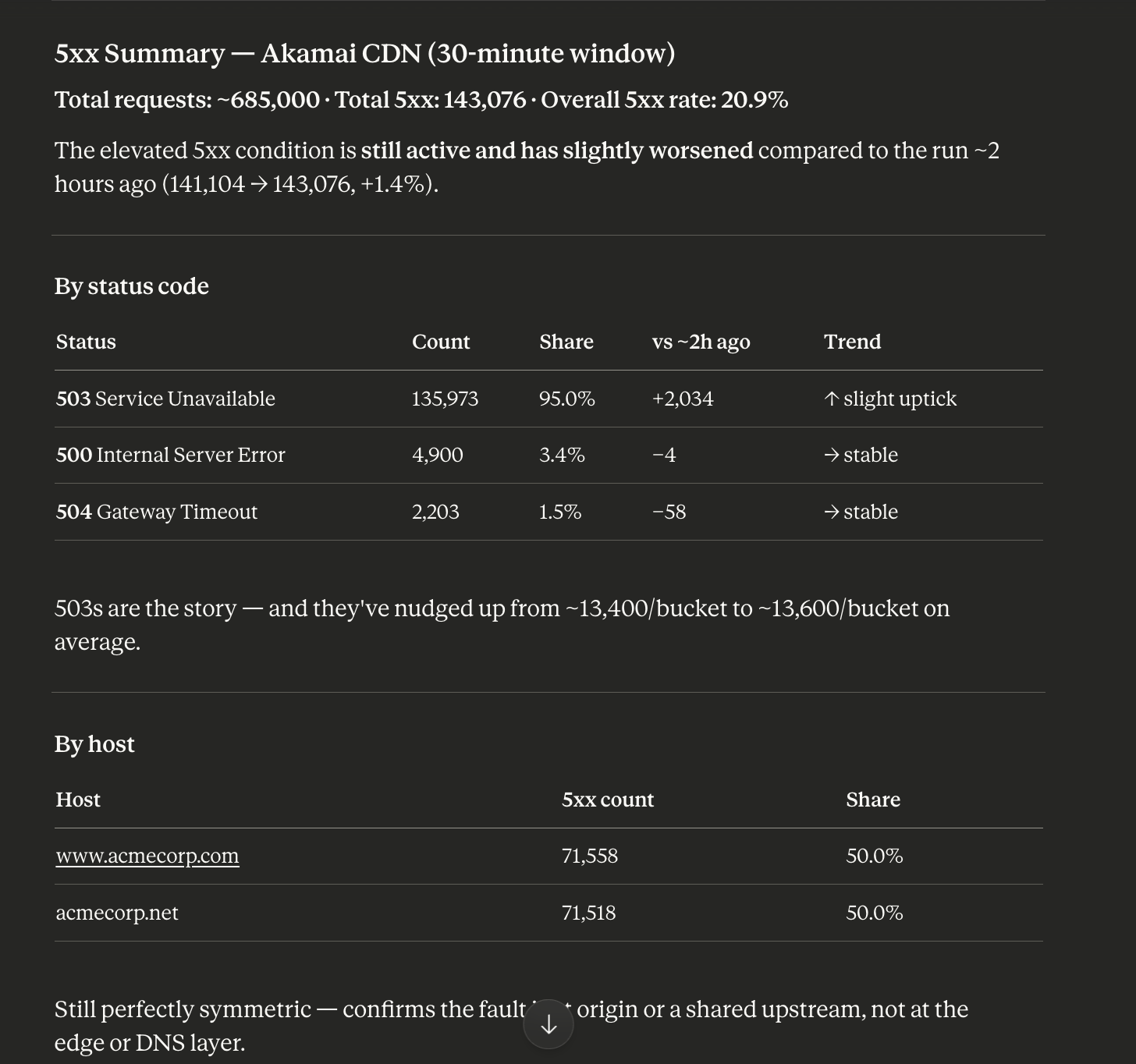
CDN 5xx regression result.
Example 3: Investigate latency regressions
Prompt:
Compare CDN response-time metrics for the last hour against the previous hour and identify the hosts or paths with the largest regression.
What to look for in CDN logs:
increases in origin time or total response time
regressions concentrated on one host or endpoint
whether the issue appears at the edge or upstream
whether the shift aligns with deploy or traffic changes
This is especially useful when users report "the site feels slower" but there is no obvious outage.
This is the kind of latency investigation the hosted MCP workflow makes easier: compare time windows, identify the worst regressions, and narrow quickly to the hosts and paths driving the slowdown.
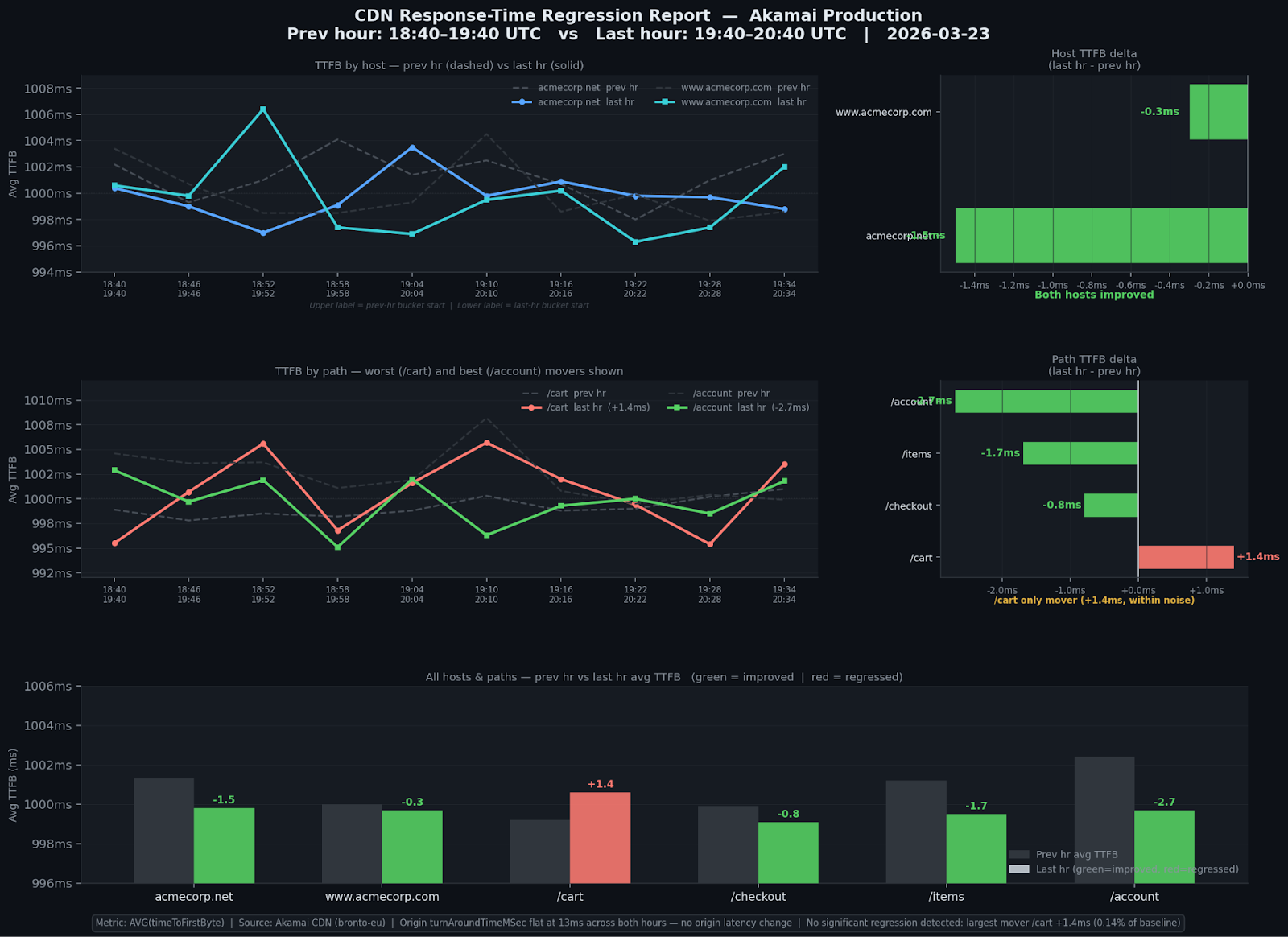
Response Time regression result.
Example 4: Look for cache effectiveness problems
Prompt:
"Search our CDN logs for cache-related fields and show whether cache miss rates increased in the last 24 hours."
What to look for in CDN logs:
cache hit vs miss patterns
sudden increases in origin fetches
path prefixes with poor cache efficiency
changes after a release or cache-key adjustment
This kind of question is often hard to answer quickly if you do not already know the exact field names in the dataset. MCP helps by discovering the relevant keys first, then narrowing the search.
This is the kind of cache analysis the hosted MCP workflow makes easier: identify where cache misses are increasing, see which paths are driving origin load, and tell whether the issue is broad or concentrated.
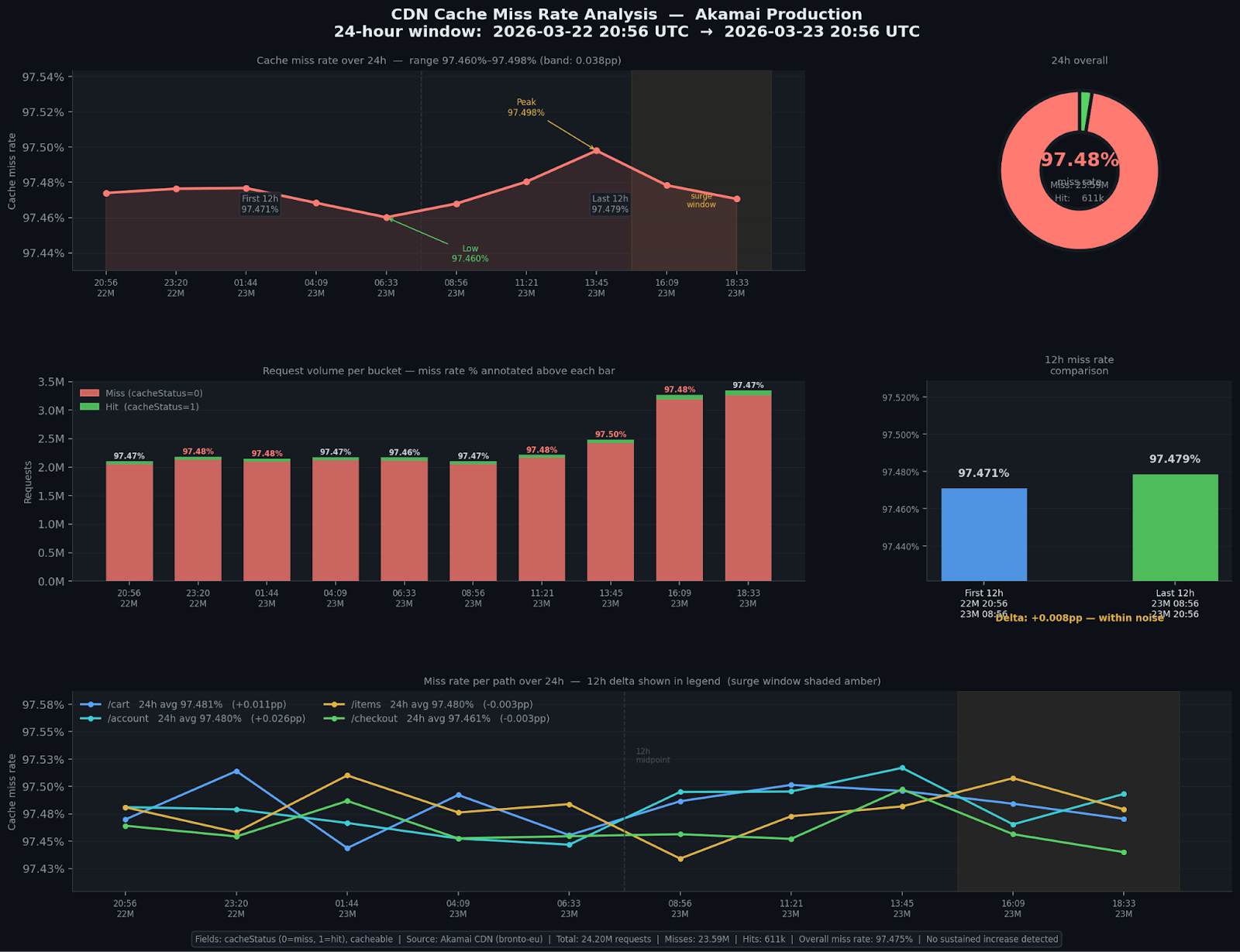
Cache miss analysis result.
Example 5: Investigate abusive or unusual traffic
Prompt:
"Use CDN logs from the last 15 minutes to find unusual request-volume spikes by client IP, user agent, host, and path."
What to look for in CDN logs:
sudden traffic concentration from a small set of IPs
repeated hits to a small set of endpoints
suspicious user-agent patterns
abnormal request mix compared with baseline traffic
This helps with:
bot traffic
scraper spikes
attack reconnaissance
or accidental client retry storms
This is the kind of traffic investigation the hosted MCP workflow makes easier: isolate sudden spikes, see which IPs or paths dominate the burst, and decide quickly whether you are looking at bots, scrapers, or retry storms.
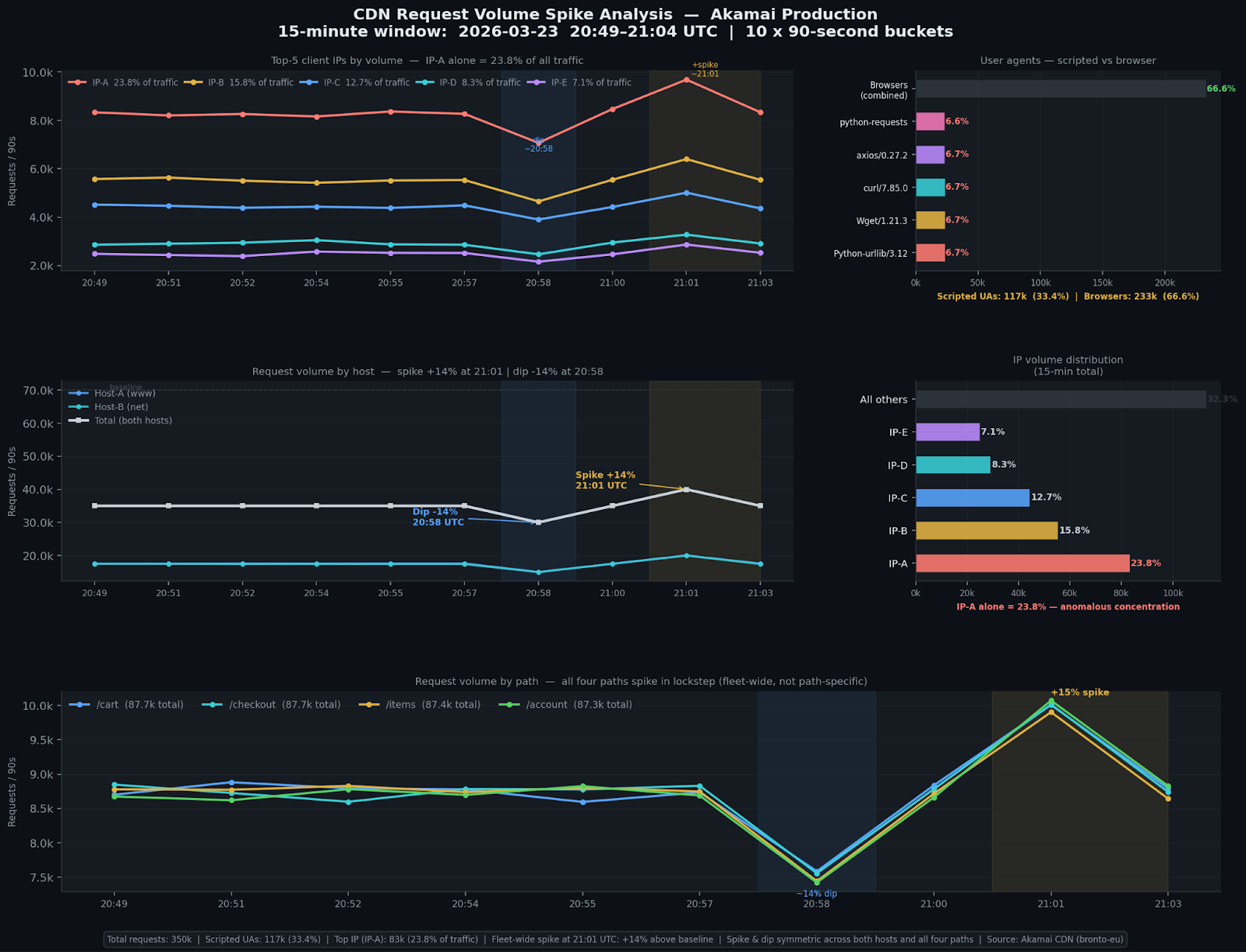
Traffic spike analysis result.
Closing thoughts
The original Bronto MCP Server post showed that log data is a strong MCP use case. The hosted version makes that workflow much easier to operationalize.
Instead of asking users to install and run infrastructure locally, Bronto can now provide the MCP endpoint directly, with MCP sign-in and access managed through the product itself, as it would be for other uses of Bronto such as the UI or direct API.
And CDN logs are exactly the kind of data where this shines: large volumes, fast-moving operational questions, and investigations that benefit from being able to move fluidly from dataset discovery, to raw search, to concrete explanations.
If the first phase of MCP was proving that AI clients can be useful on top of log data, the hosted phase is about making that capability practical for more teams and allow them to analyse, find faults and debug more easily and quickly.
Enjoyed this post?
Share it with your team or network.

Try Bronto free for 14 days
Centralize your agent and infrastructure telemetry in one platform with sub-second search and 12-month hot retention.
- 14-day free trial
- No credit card
- Set up in minutes